Live Web App · UI/UX Case Study

PokeCalcs
A live analysis tool for comparing complex matchups, moves, and team tradeoffs quickly.
Role
Solo product design, UI/UX, frontend implementation
Type
Live web app / competitive analysis tool
Focus
Expert workflows, high-density UI, responsive behavior
Compare every matchup faster.
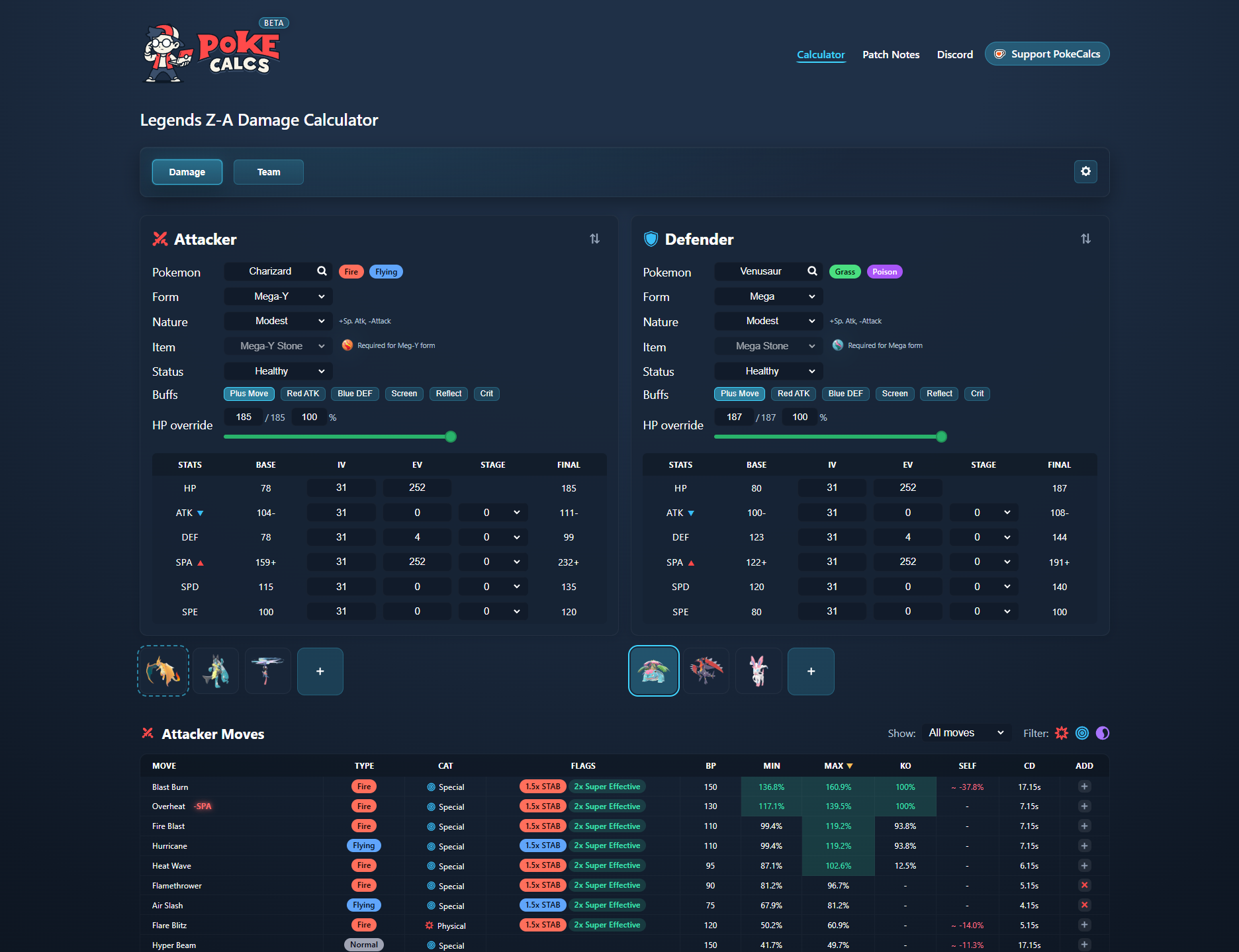
Project snapshot
A high-density decision tool for comparing complex matchup variables quickly.
Product context
PokeCalcs is a decision tool for competitive players. It helps users compare damage, moves, team coverage, and matchup risk without rebuilding the same calculations over and over.
Design challenge
The core UX problem was density: expert users needed speed and control, so the interface had to make complex variables scannable without hiding important details.
Role and focus
I defined the workflows, designed the interface system, prioritized feature behavior, built the frontend, and iterated from repeated friction points in the analysis process.
Live product signal
PokeCalcs continues to see organic demand beyond the launch cycle, ranking as the top Google result for "Legends ZA calculator" and averaging roughly 150-230 daily unique visitors months after the game's October launch window.
Tools & Process
HTML/CSS
Adobe Illustrator
ChatGPT-assisted implementation
Timeline
Continuous live updates post-launch
Live App
The Problem
Research & analysis
Competitive players need to compare many variables quickly: stats, moves, matchups, team coverage, buffs, drawbacks, and likely outcomes. Existing tools often require repeated stat entry, one-move-at-a-time calculations, tab switching, and manual comparison.
The challenge was not a lack of data. It was designing a high-density interface that kept expert controls visible while making the most important decisions easier to scan.
Old workflow
Slow setup
New workflow
Faster analysis
Optimizing Information Density
Design approach
The interface prioritizes rapid decision-making for experienced users while keeping large amounts of matchup data scannable.
I avoided oversimplifying the workflow because expert users still need control. The design focuses on reducing repeated setup, keeping context visible, and making comparisons faster.
Stat Setup
Workflow optimization
Competitive stat configuration involves constant iteration, but repeated manual setup slows down the moment when users are trying to compare outcomes.
I used strength-based build suggestions because repeated setup was one of the biggest sources of friction, while preserving advanced controls for precise optimization and custom tuning.
Move Comparison
Core workflow
Existing calculators force users through repeated one-move-at-a-time comparisons, which slows down expert analysis when many variables need to be evaluated together.
I kept damage, cooldowns, buffs, and drawbacks visible together because expert users need to compare tradeoffs, not isolated numbers.
Integrated matchup data
Matchup information stays visible during comparison.
Matchup context remains visible during comparison so players can evaluate moves without relying on separate type charts or external references.
Color-coded strengths, weaknesses, and bonuses improve rapid scanning across complex matchup scenarios.
All moves visible
Compare multiple outcomes without repeated recalculation.
KO chance highlighted
High-value outcomes stand out during rapid scanning.
Tradeoffs included
Tradeoffs remain visible alongside primary damage output.
Faster filtering
Filtering supports faster iteration during matchup analysis.
Team Analysis
Team-level analysis
Competitive team building requires evaluating coverage across the entire roster instead of analyzing one character at a time.
I surfaced team-level patterns because roster decisions depend on coverage across the whole team, not one matchup at a time.
Additional Features
Workflow Enhancements
Legends Z-A Support
Added support for Legends Z-A specific mechanics including Plus Moves, damage and defense modifiers, and updated battle multipliers.
Mega Evolution Automation
Mega Evolution states are managed automatically based on selected Pokemon and forms to reduce repetitive configuration.
Import / Export
Supports importing individual Pokemon and full teams using competitive formats to reduce repeated setup and manual rebuilding.
Damage Flags & Cooldowns
Combat modifiers including STAB, effectiveness, cooldowns, and item bonuses remain visible directly inside comparison workflows.
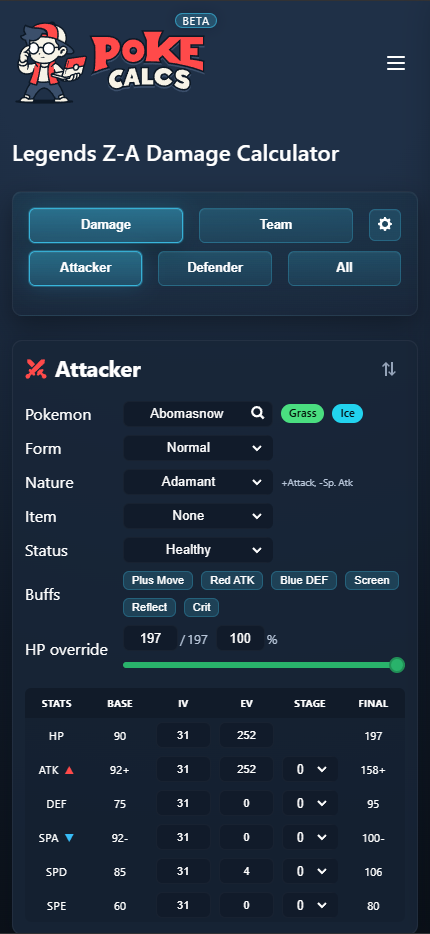
Mobile Support
Mobile-first workflow
The mobile experience restructures the workflow for smaller screens instead of compressing the desktop interface into an unusable layout.
From Spreadsheet to Web App
Iterative Development
The project originally began as an Excel calculator, but spreadsheet limitations, repeated setup workflows, and performance constraints made the experience difficult to scale.
Rebuilding the calculator as a web application turned the workflow into a centralized product with faster comparison, persistent state, and responsive usability across devices.
Most features originated from repeated friction points encountered while using existing competitive tools, then redesigning those workflows into more efficient interaction patterns.
ChatGPT was used to accelerate JavaScript implementation and debugging, while product direction, UX decisions, visual design, and feature planning were self-directed.
Outcome
Result
The live app supports all-move comparison, team-level matchup analysis, strength-based build suggestions, and responsive use across desktop and mobile.
All-move comparison
Compare multiple matchup outcomes inside a persistent, scannable workflow without repeated recalculation.
Team analysis
Coverage, weaknesses, and matchup relationships are surfaced through scannable team-level analysis views.
Mobile support
Core workflows remain usable across smaller screens through responsive layout restructuring instead of reduced functionality.